Which Fish Finder Is Easiest to Use?
The easiest fish finder to use has clear controls, simple sonar views, and only the features you need. For a small boat, compare the Garmin Striker 4, Lowrance Eagle 4x, and Humminbird PiranhaMAX 4; for shore or kayak fishing, consider the Garmin Striker Cast with GPS.
On this page (7 sections)
- Which fish finder is easiest to use for your setup?
- What makes a fish finder easy to learn?
- Which controls and screen features help most?
- Is a mounted or castable fish finder easier to use?
- How can you tell if a fish finder screen will be clear enough?
- What should you expect when learning sonar?
- Which fish finder is easiest to use for you?
The easiest fish finder to use has clear controls, simple sonar views, and only the features you need. For a small boat, compare the Garmin Striker 4, Lowrance Eagle 4x, and Humminbird PiranhaMAX 4; for shore or kayak fishing, consider the Garmin Striker Cast with GPS.
Ease of use depends on where you fish and how much setup you want to handle. A boat-mounted display with dedicated controls may feel simpler than managing an app, while automatic sonar settings can help if you'd rather adjust fewer options.
Which fish finder is easiest to use for your setup?
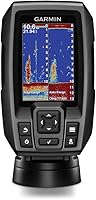
For a straightforward boat-mounted unit, start with the Garmin Striker 4 or Lowrance Eagle 4x. The Garmin has dedicated buttons, and the Lowrance has Auto-Tuning Sonar; both focus on features that can make basic operation more direct.
The Humminbird PiranhaMAX 4 is another compact option, with a tilt-and-swivel mount and sonar choices for detail or wider coverage. If you fish from shore or a kayak and want to avoid mounting a display, the Garmin Striker Cast with GPS pairs with a mobile device.
What makes a fish finder easy to learn?
Simple controls, readable sonar, and a manageable number of settings make a fish finder easier to learn. A short path to the views you use most can matter more than a long feature list.
Consider these factors before choosing:
- Controls: Dedicated buttons can make common actions easy to find. Auto-tuning can reduce how often you adjust sonar settings.
- Screen: Choose a display you can read from your normal fishing position. The Lowrance Eagle 4x has a 4-inch portrait screen designed to stay clear in bright sunlight and through polarized sunglasses.
- Sonar display: Fish icons may make a quick scan easier, while traditional sonar views can show fish and structure in more detail.
- Setup: Check whether you want a mounted display and transducer, or a castable unit that pairs with your phone.
- Features: Mapping, GPS, alarms, and imaging can be useful, but they may add menus to learn. Choose the functions you expect to use.
A fish finder won't identify every mark for you. Learning how depth, structure, and sonar returns relate to each other still takes practice.
For a broader look at display styles and mounting approaches, read the types of fish finders and which kind fits how you fish. If you're new to operating one, fish finders for first-time owners covers beginner-focused choices.
Is Auto-Tuning Sonar easier than manual controls?
Auto-Tuning Sonar can make startup simpler because it automatically provides optimized settings. That may suit you if you want to spend less time adjusting sonar before fishing.
The Lowrance Eagle 4x also shows fish icons with depth and includes zoom for a closer look. If you prefer direct button controls and waypoint marking, the Garmin Striker 4 may fit better.
Neither approach removes the need to learn what the screen shows. To understand sonar returns and fish arches, start with how to read a fish finder screen.
Which controls and screen features help most?
Choose controls that make your most common actions easy to reach. A simple interface is useful when it matches the way you plan to use the unit.
The Garmin Striker 4 has a keyed interface with dedicated buttons. It also includes a waypoint map for marking and returning to locations such as brush piles, stumps, and docks.
The Humminbird PiranhaMAX 4 offers a tilt-and-swivel mount so you can adjust the viewing angle. Its dual-beam sonar gives you a choice between a narrower beam for detail and a wider area of coverage.
The Lowrance Eagle 4x combines automatic sonar settings with fish icons and zoom. Its twist-lock connector is designed to make connecting and removing the display simple.
Think about where the screen will sit before you buy. A display that's easy to read from your seat can be more useful than extra features you have to lean forward to reach.
Is a mounted or castable fish finder easier to use?
A mounted unit is often easier if you want a dedicated screen on your boat. A castable unit can suit shore or kayak fishing if you're comfortable using a phone or tablet as the display.
The Garmin Striker Cast with GPS pairs with a compatible Apple or Android device through its free app. It streams sonar wirelessly to your phone or tablet, and built-in GPS can create custom fishing maps with 1-foot contours using Quickdraw Contours software.
This setup has a few more parts to manage: the sonar device, your mobile device, and the app. The sonar streams from up to 200 feet away, but you still need to keep your phone or tablet available to view it.
If you want a mounted display instead, compare fish finders with GPS for marking spots. For kayak-specific mounting and power questions, see how to mount a fish finder on a kayak.
How can you tell if a fish finder screen will be clear enough?
Match the screen to the distance, light, and viewing angle where you'll use it. A small display may work for simple depth and fish checks, while more detailed views are easier to inspect on a larger screen.
The Garmin Striker 4 has a 3.5-inch display. The Lowrance Eagle 4x has a 4-inch portrait screen, while the Humminbird PiranhaMAX 4 has a 4.3-inch color LCD.
Screen size is only one part of readability. The Eagle 4x is designed for bright sunlight and polarized sunglasses, while the PiranhaMAX 4's tilt-and-swivel mount lets you adjust its viewing angle.
If you fish in changing light, check the display from the position where you'll actually sit or stand. Menu clarity and screen glare can affect ease of use as much as the number of controls.
What should you expect when learning sonar?
Expect to learn a few basic screen cues even with an easy-to-use fish finder. The unit can show sonar information, but you decide what to do with it.
Start by checking depth, then learn how the bottom and structure appear on your selected sonar view. Use one view at a time until you can tell how the display changes as your boat moves or you adjust the range.
The Garmin Striker 4's CHIRP sonar sends a continuous sweep of frequencies, which Garmin says can create crisper fish arches and better target separation. The PiranhaMAX 4 lets you switch between narrow and wide beams for detail or broader coverage.
For more on the basics, read what a fish finder is used for and what sets a fish finder apart from a depth finder. Those guides explain what information the screen can show and where its limits are.
Which fish finder is easiest to use for you?
Choose the Garmin Striker 4 if you want dedicated buttons and a waypoint map. Choose the Lowrance Eagle 4x if Auto-Tuning Sonar and fish icons appeal to you, or the Humminbird PiranhaMAX 4 if you want dual-beam choices and an adjustable viewing angle.
For shore or kayak fishing with a mobile device, the Garmin Striker Cast with GPS offers app-based wireless sonar. Compare its phone-based setup with a mounted unit before you decide.
If you want the simplest first purchase, focus on how you fish, which controls feel clear, and what you need to see on screen. Then use the beginner fish finder guide to narrow your options.
Frequently asked questions
Which fish finder is easiest for a beginner?
A basic unit with dedicated buttons, a readable screen, and a small set of useful sonar views is often easiest to learn. The Garmin Striker 4 has a keyed interface with dedicated buttons, while the Lowrance Eagle 4x has Auto-Tuning Sonar.
Choose based on whether you prefer direct controls or automatic sonar settings.
Is a touchscreen fish finder easier to use?
A touchscreen can make menus feel familiar, but ease depends on the controls, screen layout, and conditions where you fish. Dedicated buttons can be simpler when you want direct access to key functions.
Compare how each unit handles sonar views and settings before choosing.
What fish finder features make it easier to use?
Look for clear controls, a screen you can read in your fishing conditions, and sonar settings that are easy to understand. Auto-tuning can reduce adjustments, while fish icons and zoom can simplify a quick scan.
Extra features help only when they match how you fish.
Is a castable fish finder easy to use?
A castable fish finder can be simple to set up if you already use a compatible smartphone or tablet. The Garmin Striker Cast pairs with its free app and streams sonar wirelessly to your mobile device.
You still need to manage the phone, app, and castable sonar together.