Fish Finder vs Depth Finder: What Sets Them Apart (October 2026)
A fish finder is a depth finder with added tools for spotting fish and reading underwater structure. Many units do both jobs, so compare the sonar display and fishing features you need rather than the name alone.
On this page (6 sections)
- What is the difference between a fish finder and a depth finder?
- Which features matter for your fishing?
- Can you use a fish finder away from a boat?
- Which of these fish finders fits the difference you care about?
- How can you tell what sonar marks mean?
- How should you choose between a fish finder and a depth finder?
A fish finder is a depth finder with added tools for spotting fish and reading underwater structure. Many units do both jobs, so compare their sonar views and fishing features rather than relying on the product name.
A depth finder gives you a reading of how deep the water is below the transducer. A fish finder uses sonar too, but may show more detail about fish, bottom shape and structure.
The names overlap because many products combine both functions. For more on the main designs, read our guide to types of fish finders.

What is the difference between a fish finder and a depth finder?
The main difference is how much sonar information the display helps you interpret. A depth finder centers on depth, while a fish finder may add fish details, structure views or tools for saving fishing spots.
Both use sonar to send sound and receive echoes from below the boat or device. A simple unit can turn those echoes into a depth reading, while a more feature-rich model can show sonar returns in more detail.
That extra detail takes practice to read. A fish finder does not identify every object with certainty, and a fish icon is an interpretation of sonar data rather than a guarantee.
What does a depth finder show?
A depth finder helps you see the distance from the transducer to the bottom. Depending on the unit, it may also show a scrolling sonar history or bottom contour.
That can be enough if your main concern is knowing the water depth under a boat. It can also help you track changes as you move through a channel or across a flat.
A depth reading alone doesn't tell you whether a mark is a fish, a branch or another object. If identifying those returns matters, look for a display that adds fish views or more detailed sonar.
What can a fish finder add?
A fish finder may show fish arches or icons, vegetation, structure and bottom detail. Features vary, so check which views are included before choosing a unit.
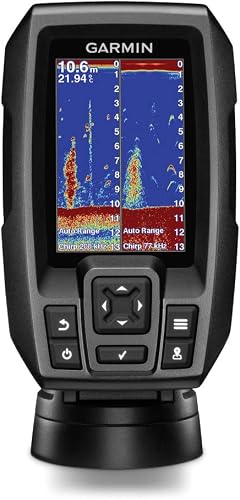
For example, CHIRP sonar sends a sweep of frequencies. Garmin says its CHIRP sonar can create crisper fish arches with better target separation, while ClearVü scanning sonar shows objects, structure and fish.
A fish finder may also include a way to mark locations. The Garmin Striker 4 has a waypoint map for marking places such as brush piles, stumps and docks.
Which features matter for your fishing?
Choose features based on where and how you fish. A depth readout may meet a simple need, while fish views, saved locations or a portable design can help with more specific situations.
A unit with several sonar views can provide more information, but only if you'll use it and can see its screen from your fishing position. Smaller displays may require more attention when reading details.
Our guide to what a fish finder is used for explains common uses, from checking depth to finding structure.
When is a depth reading enough?
A basic depth reading may be enough if you mainly want to track water below your transducer. It gives a direct answer to “how deep is it here?” without requiring you to interpret multiple views.
Think about how you fish. If you follow familiar water and want a quick depth check, a simple display may cover the task.
If you want to locate fish or distinguish bottom features, look for those specific capabilities. Don't assume a device labeled “depth finder” includes fish icons, a waypoint map or scanning sonar.
When do fish details help?
Fish views help when you want more information than a depth number. Fish icons and zoom can make sonar easier to scan, while CHIRP and scanning sonar offer different ways to examine returns.
The Lowrance Eagle 4x shows fish icons with depth and offers zoom for a closer look. Its Auto-Tuning Sonar adjusts settings automatically, which can be helpful if you'd rather spend less time changing sonar settings.
When is a waypoint map useful?
A waypoint map is useful when you want to mark places and return to them later. It can help you save a location such as a brush pile or dock instead of relying on memory alone.
The Garmin Striker 4 includes a waypoint map. Its built-in flasher also gives you a classic flasher view for ice fishing or vertical jigging.
Don't assume every fish finder has a map or GPS features. Check for a waypoint function if saving and revisiting spots is part of your plan.
Can you use a fish finder away from a boat?
Yes, a castable fish finder can send sonar information to a phone while you fish from shore or a kayak. Check its range, app requirements and how it connects before choosing one for that setup.
The Deeper Start generates its own Wi-Fi and pairs with the Fish Deeper app on an iOS or Android device. The app can show fish location and size, depth, bottom contour and vegetation.
It can cast up to 165 feet and scan down to 165 feet. Those limits may suit shorter casts, but consider your usual distance from shore before buying.
For a boat-mounted option, compare screen size, transducer placement and the views you plan to use. Our guide to reading a fish finder screen explains how sonar marks and displays fit together.
Which of these fish finders fits the difference you care about?
Pick the Garmin for more sonar views and saved locations, the Lowrance for a straightforward fish-and-depth display, or the Deeper for portable casting. Each combines depth information with a different set of features.
The Garmin Striker 4 has CHIRP, ClearVü, waypoints and a built-in flasher. It's the most feature-rich option here if you want both sonar detail and the ability to mark locations.
The Lowrance Eagle 4x has a 4-inch IPS portrait screen, fish icons with depth, zoom and Auto-Tuning Sonar. Choose it if those views fit your needs and you don't need a waypoint map.
The Deeper Start pairs with a phone app and casts from shore, a dock, a bank or a kayak. It's the portable choice, with a casting distance and scan depth of up to 165 feet.
How can you tell what sonar marks mean?
Learn to read the display as a set of clues, not a certain fish count. Depth, bottom shape and the appearance of a return can help you interpret what the sonar is showing.
Sonar views vary by device and settings. A fish icon may make a display easier to scan, while arches or other returns may require more practice.
Our guide to how fish finders work covers what sonar can show and where its limits are. Pair that with the device's manual to understand the controls and views on your specific unit.
How should you choose between a fish finder and a depth finder?
Choose a depth finder if a water-depth reading is your main need; choose a fish finder when you also want fish, structure or location features. Many units combine both, so compare the functions you plan to use.
For a boat, decide whether sonar detail, waypoints or an easy-to-read screen matter most. For shore or kayak fishing, consider whether a castable unit and phone app fit your routine.
Choose the Garmin Striker 4 for CHIRP, ClearVü and a waypoint map. Choose the Lowrance Eagle 4x for fish icons, depth and zoom, or the Deeper Start if you want a castable setup with a phone app.
Frequently asked questions
Is a fish finder the same as a depth finder?
Many fish finders also show depth, but a basic depth finder may focus on the bottom reading alone. A fish finder can add views or tools for interpreting fish and structure, such as fish icons, CHIRP sonar, scanning sonar or saved locations.
Check the exact unit's features.
Can a depth finder show fish?
Some depth finders show sonar returns that may include fish, while others focus on a depth number and bottom contour. Fish icons or clearer target separation can make fish easier to interpret, but the display doesn't guarantee that every mark is a fish.
Do fish finders work from shore?
A castable sonar unit can work from shore if it sends scans to a phone or another display. The Deeper Start pairs with a mobile app and is designed for shore, bank, dock and kayak fishing; its casting distance is up to 165 feet.
Does every fish finder include GPS?
No. Some units include location tools, while others focus on sonar and depth.
The Garmin Striker 4 has a waypoint map for marking and returning to spots, but check the features of any model you consider instead of assuming GPS is included.
Which is better for a small boat, a fish finder or depth finder?
Choose by the information you need. A basic depth display may be enough if you mainly want to know water depth, while a fish finder with fish views and structure detail offers more ways to read the water.
For small-boat options, see our guide to fish finders for a 14-foot aluminum boat.