Humminbird Helix 5 vs Helix 7: Which Screen Fits? (October 2026)
Choose the Helix 7 if you want Side Imaging and a larger screen; choose a Helix 5 if its 5-inch display and sonar features fit your setup. The exact Helix 5 model matters because these options have different imaging.
On this page (6 sections)
Choose the Helix 7 if you want Side Imaging and a larger screen; choose a Helix 5 if its 5-inch display and sonar features fit your setup. In the Humminbird Helix 5 vs 7 comparison, the exact Helix 5 model matters because the two options here don't offer the same imaging.
The Helix 5 CHIRP GPS G3 has a 5-inch color display, Dual Spectrum CHIRP sonar, GPS and AutoChart Live. The Helix 7 CHIRP SI GPS G4 adds a 7-inch display, CHIRP Side Imaging and Down Imaging.
A third option, the Helix 5 CHIRP DI GPS G3, keeps the smaller screen and adds Down Imaging. Match the model to the sonar view you need, then check that its screen and mounting arrangement fit your boat.

Humminbird Helix 5 vs 7: what is the main difference?
The Helix 7 gives you a bigger display and Side Imaging; the Helix 5 gives you a smaller display with a choice of sonar configuration. The 5-inch models compared here include Dual Spectrum CHIRP, GPS and AutoChart Live.
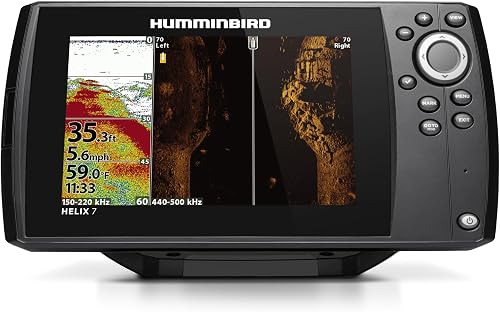
The Helix 7 CHIRP SI GPS G4 combines Side Imaging and Down Imaging with Dual Spectrum CHIRP. Side Imaging shows fish and structure to the left and right of your boat, while Down Imaging focuses below it.
The Helix 5 CHIRP GPS G3 covers Dual Spectrum CHIRP sonar and navigation features. If you want Down Imaging on a 5-inch screen, the Helix 5 CHIRP DI GPS G3 adds that view.
Use the 7-inch fish finder and GPS guide to compare other units with a larger screen. If seeing structure beyond the area directly below your boat matters, our Side Imaging fish finder guide explains what to look for.
Which screen size suits your boat?
Choose the 5-inch display when it fits your console and your viewing needs; choose 7 inches when you want a larger screen for reading sonar and mapping views. Measure the mounting area before you decide.
A screen that looks clear in a product photo may feel cramped once it shares space with other controls. Mark the screen footprint on the console and check that you can still reach the keypad and see the display from your usual position.
The Helix 5 CHIRP GPS G3 is listed with a transom-mount transducer and gimbal mounting bracket. The Helix 7 CHIRP SI GPS G4 also includes a transom-mount transducer and gimbal bracket, though its mounting type is described as surface mount.
Treat the included hardware and mounting description as a starting point. Confirm the manual's installation requirements for your boat before cutting or drilling.
Is the Helix 5 easier to fit on a small boat?
A 5-inch display can be easier to place in a tight console because it takes less screen space than a 7-inch display. Your available mounting area, viewing angle and access to other controls still determine the fit.
Small boats often have limited console space for electronics and wiring. The smaller screen can help, but don't assume that it will fit every location or that the transducer can go anywhere.
Read our guide to fish finders for a 14-foot aluminum boat for more setup considerations. For mounting questions, see where to mount a fish finder transducer.
What sonar views do you get with each model?
The Helix 7 SI model offers Side Imaging and Down Imaging; the Helix 5 models offer Dual Spectrum CHIRP, with the DI version adding Down Imaging. Choose based on whether you want to scan beside the boat, beneath it or both.
All three models include Dual Spectrum CHIRP sonar with Wide and Narrow modes. Wide Mode favors coverage, while Narrow Mode focuses on detail.
The Helix 7 adds Side Imaging for views to either side and Down Imaging beneath the boat. The Helix 5 CHIRP DI GPS G3 offers Down Imaging, but the Helix 5 CHIRP GPS G3 described here does not include that feature.
These are different tools for reading the water, not a simple measure of which unit is better. Our guide to reading a fish finder screen can help you understand what sonar views show once you're on the water.
Helix 5 CHIRP GPS G3: Dual Spectrum CHIRP
The Helix 5 CHIRP GPS G3 is the straightforward choice if you want a compact display with Dual Spectrum CHIRP, GPS and mapping. It includes a Low-Q transducer for 2D target separation.
Its Wide and Narrow modes let you choose between broader coverage and more focused detail. That can suit an angler who mainly wants to read fish arches, structure and the bottom beneath the boat.
This model doesn't include Side Imaging in the features described here. Choose a different Helix 5 model if you want Down Imaging on the smaller screen.
Helix 5 CHIRP DI GPS G3: add Down Imaging
The Helix 5 CHIRP DI GPS G3 adds CHIRP Down Imaging while retaining Dual Spectrum CHIRP sonar, GPS and AutoChart Live. It suits a buyer who wants a detailed view beneath the boat and a 5-inch screen.
It does not add Side Imaging. If you want to scan to the left and right of the boat, the Helix 7 SI model is the option among these three that names that feature.
Helix 7 CHIRP SI GPS G4: scan below and to the sides
The Helix 7 CHIRP SI GPS G4 combines Side Imaging and Down Imaging with Dual Spectrum CHIRP. The larger screen gives those views more display area, which can be useful when comparing the sonar picture with mapping information.
Side Imaging is most relevant if you want to look beyond the area directly under your boat. If you mainly use a 2D sonar view and need a compact display, the Helix 5 may fit your needs with less screen space.
How do GPS and mapping compare?
All three models here include Humminbird Basemap and AutoChart Live. Their mapped coverage and recording time are the same in the product information provided.
Basemap covers more than 10,000 lakes and continental U.S. coastlines. The models are also compatible with premium LakeMaster, CoastMaster and Navionics charts.
AutoChart Live can create maps of depth contours, bottom hardness and vegetation while you boat. It has eight hours of built-in recording time and works with AutoChart Zero Line SD cards for expanded mapping capacity.
The Helix 7's larger display can make map details easier to view alongside sonar, but the shared mapping features don't make it the only navigation option. Compare screen size and the sonar features you need first.
If navigation is your priority, our guide to fish finders with GPS covers other choices. For a wider comparison between the brands, see Garmin vs Humminbird fish finders.
Which unit is easier to operate?
Each model uses keypad control and a softkey menu, so choose by screen and sonar needs rather than assuming one has a different control style. The shared button approach can suit anglers who prefer physical controls.
The Helix 5 CHIRP GPS G3 and Helix 5 CHIRP DI GPS G3 use softkey controls to access views and settings. The Helix 7 CHIRP SI GPS G4 also uses a keypad and softkey menu for its preloaded views.
A larger screen does not automatically make a unit simpler to use. Think about which sonar and mapping views you'll check, and how much space you want them to occupy on the display.
Which Humminbird Helix should you choose?
Pick the Helix 7 CHIRP SI GPS G4 if you want a 7-inch screen with Side Imaging and Down Imaging. Choose the Helix 5 CHIRP GPS G3 for a smaller screen with Dual Spectrum CHIRP, GPS and AutoChart Live, or the Helix 5 CHIRP DI GPS G3 if you also want Down Imaging.
The decision rule is simple: match the display to your console, then choose the imaging views you'll use. The Helix 5 and Helix 7 models here share GPS mapping features, but their screen sizes and sonar configurations differ.
For another brand comparison, read Humminbird vs Lowrance. If you already know you want a larger screen, compare more options in our 7-inch fish finder and GPS guide.
Frequently asked questions
Is the Humminbird Helix 7 better than the Helix 5?
The Helix 7 is the stronger fit if you want a 7-inch display plus Side Imaging and Down Imaging. The Helix 5 can suit a smaller console and still offers Dual Spectrum CHIRP, GPS and AutoChart Live.
Pick by screen space and the sonar views you will use.
Does every Helix 5 have Down Imaging?
No. The Helix 5 CHIRP GPS G3 described here has Dual Spectrum CHIRP sonar and GPS, while the Helix 5 CHIRP DI GPS G3 also includes Down Imaging.
Check the exact model name so you get the imaging feature you want.
Does the Helix 7 have Side Imaging?
The Helix 7 CHIRP SI GPS G4 includes CHIRP Side Imaging and Down Imaging. Side Imaging shows fish and structure to the left and right of the boat, while Down Imaging focuses beneath it.
Do the Helix 5 and Helix 7 include GPS mapping?
The three models compared here include Humminbird Basemap and AutoChart Live. Basemap covers more than 10,000 lakes and continental U.S. coastlines, and AutoChart Live can map depth contours, bottom hardness and vegetation with eight hours of built-in recording time.
Which Helix fits a smaller boat console?
A 5-inch Helix may fit a tighter console more easily than a 7-inch Helix, but measure the space and allow room to operate the keypad. The display size alone doesn't confirm mounting clearance, so plan around your console and the unit's mounting hardware.