7 Best Side Imaging Fish Finders for Reading Cover (October 2026)
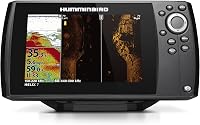
The best side imaging fish finders for reading cover include the Humminbird Helix 7 CHIRP SI GPS G4 for detailed cover scans, the Garmin ECHOMAP UHD2 63sv for touchscreen chartplotting, and the Humminbird Helix 7 G4 MEGA Side Imaging for stated side-scan range.
On this page (6 sections)
The best side imaging fish finder for most anglers is the Humminbird Helix 7 CHIRP SI GPS G4. It combines side and down imaging with Dual Spectrum CHIRP, internal GPS and AutoChart Live mapping.
For a touchscreen chartplotter, consider the Garmin ECHOMAP UHD2 63sv. If you want a 9-inch screen, compare the Garmin ECHOMAP UHD2 93sv and Striker Plus 9SV, keeping in mind their navigation features differ.
Side imaging helps you inspect structure and cover to either side of the boat. The right unit depends on how you want to read those scans, mark locations and use maps.
Our picks at a glance
-
1
-
2

-
3
 Best for stated side-scan range
Humminbird Helix 7 G4 MEGA Side Imaging
8.6/10 our score
See it on Amazon
- 4
 Best for a larger touchscreenCheck it
 - 5
 Best for GPS waypoint markingCheck it
 - 6
 Best for a large sonar screenCheck it
 - 7
 Check it
Lowrance Eagle 7 TripleShot HD
Best for FishReveal views
The best side imaging fish finders for reading cover
The Helix 7 CHIRP SI GPS G4 leads this group for its mix of side imaging, down imaging, CHIRP and mapping features. Other picks suit anglers who prioritize a touchscreen, a stated scan reach, a larger display or fish-target overlays.
Our scores weigh each unit’s sonar features, navigation tools and fit for anglers searching cover from a boat. We compared the listed features and matched them to those needs.
| Product | Best for | Display | Sonar | Navigation | Our score |
|---|---|---|---|---|---|
| Humminbird Helix 7 CHIRP SI GPS G4 | detailed cover scans | 7-inch color TFT | CHIRP Side Imaging, Down Imaging and Dual Spectrum CHIRP | Internal GPS, Humminbird Basemap and AutoChart Live | 8.9 |
| Garmin ECHOMAP UHD2 63sv | touchscreen chartplotting | 6-inch touchscreen | Traditional, ClearVü and SideVü | Garmin Navionics+ inland maps | 8.8 |
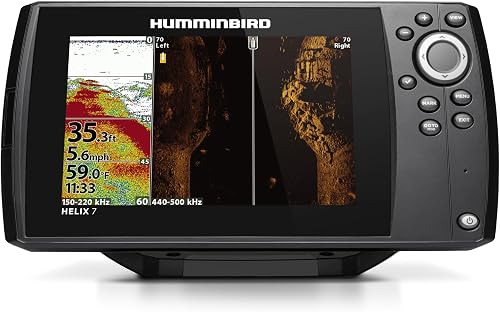
| Humminbird Helix 7 G4 MEGA Side Imaging | stated side-scan range | 7-inch color TFT | MEGA Side Imaging, MEGA Down Imaging and Dual Spectrum CHIRP | GPS, Humminbird Basemap and AutoChart Live | 8.6 |
| Garmin ECHOMAP UHD2 93sv | a larger touchscreen | 9-inch touchscreen | Traditional, ClearVü and SideVü | Garmin Navionics+ inland maps | 8.5 |
| Garmin Striker 7SV | GPS waypoint marking | 7-inch color TFT | CHIRP traditional, ClearVü and SideVü | Built-in GPS and Quickdraw Contours | 8.4 |
| Garmin Striker Plus 9SV | a large sonar screen | 9-inch WVGA | CHIRP traditional, ClearVü and SideVü | Built-in GPS and Quickdraw Contours | 8.2 |
| Lowrance Eagle 7 TripleShot HD | FishReveal views | 7-inch IPS | SideScan, DownScan and CHIRP | C-MAP inland charts and Genesis Live | 8.0 |
Humminbird Helix 7 CHIRP SI GPS G4: Best for detailed cover scans
- CHIRP Side Imaging and Down Imaging
- Dual Spectrum CHIRP
- Internal GPS and Humminbird Basemap
- AutoChart Live mapping
Side and down imaging pair with Dual Spectrum CHIRP for scanning cover and checking fish-holding structure. GPS, basemap charts and real-time mapping add navigation tools.
Pros
- Side and down imaging
- Two Dual Spectrum CHIRP search modes
- Includes GPS and real-time mapping
Cons
- Button-operated menu instead of a touchscreen
- Optional premium charts are separate
The Helix 7 CHIRP SI GPS G4 suits anglers who want more than a side scan on screen. Its CHIRP Side Imaging shows structure to the left and right of the boat, while Down Imaging adds a view beneath it.
Dual Spectrum CHIRP offers Wide Mode for broader coverage and Narrow Mode for focusing on detail. That gives you a second sonar view for checking the bottom and fish-holding structure before you cast.
Internal GPS and Humminbird Basemap add lake and coastal chart coverage, while AutoChart Live can map depth contours, bottom hardness and vegetation as you drive. The eight hours of built-in recording time can be expanded with a compatible AutoChart Zero Line SD card.
Controls use softkeys and a menu system rather than a touchscreen. Choose this unit if that button-based setup and its combination of sonar and mapping fit your boat; compare 7-inch fish finder and GPS combos if display size is a key part of your decision.
Garmin ECHOMAP UHD2 63sv: Best for touchscreen chartplotting
- 6-inch sunlight-readable touchscreen
- GT54-TM transducer for traditional, ClearVü and SideVü sonar
- Garmin Navionics+ inland maps
- Wi-Fi sonar and waypoint sharing
This compact ECHOMAP combines SideVü scanning sonar with a touchscreen chartplotter and inland maps. Wi-Fi can share sonar, waypoints and routes with another ECHOMAP UHD2 chartplotter.
Pros
- Touchscreen with keyed assistance
- SideVü and ClearVü scanning sonar
- Inland maps cover more than 18,000 lakes
Cons
- 6-inch screen is smaller than the 9-inch pick
- Chartplotter features may be more than you need for sonar alone
The ECHOMAP UHD2 63sv is a compact touchscreen chartplotter for anglers who want SideVü scanning and inland maps in one unit. Its included GT54-TM transducer supports traditional, ClearVü and SideVü sonar.
Garmin Navionics+ inland maps cover more than 18,000 lakes, with contours up to 1 ft. Wi-Fi also lets it share sonar, waypoints and routes with another ECHOMAP UHD2 chartplotter.
At 6 inches, its display is smaller than the 7-inch units here. That can suit a tight console, but anglers who want more screen space can compare it with the 7-inch fish finder and GPS combos.
Choose the 63sv if you want touchscreen controls and built-in chartplotter features. For a broader look at similar navigation-focused units, see our guide to fish finders with GPS.
Humminbird Helix 7 G4 MEGA Side Imaging: Best for stated side-scan range
- MEGA Side and Down Imaging
- Imaging reach stated as 125 ft to each side and below
- Dual Spectrum CHIRP
- GPS and AutoChart Live
The MEGA imaging system is described with a reach of 125 ft to either side and directly below. GPS, basemap charts and AutoChart Live round out the feature set.
Pros
- MEGA side and down imaging
- Stated 125 ft imaging reach
- Includes GPS and real-time mapping
Cons
- Button-operated controls
- Optional premium charts are separate
The Helix 7 G4 MEGA Side Imaging is a fit for anglers focused on scanning a wider area beside the boat. Its MEGA Side and Down Imaging is described with reach of 125 ft to either side and directly beneath the boat.
Dual Spectrum CHIRP adds Wide and Narrow search modes, and the unit includes GPS, Humminbird Basemap and AutoChart Live. The controls are softkeys, which keep the menu accessible without relying on touchscreen input.
The biggest distinction from the Helix 7 CHIRP SI GPS G4 is its MEGA imaging label and stated scan reach. Both combine side and down imaging with GPS and mapping, so compare their feature lists with the cover and water you fish.
For advice on interpreting the image once you find a target, read how to find fish with side imaging. It covers how to use the scan as you search.
Garmin ECHOMAP UHD2 93sv: Best for a larger touchscreen
- 9-inch sunlight-readable touchscreen
- GT56-TM transducer for traditional, ClearVü and SideVü sonar
- Garmin Navionics+ inland maps
- Wi-Fi sonar and waypoint sharing
The 9-inch screen gives chartplotting and SideVü views more display space than the 6-inch ECHOMAP. It includes a GT56-TM transducer and inland maps.
Pros
- Largest display in this roundup
- SideVü and ClearVü scanning sonar
- Inland maps cover more than 18,000 lakes
Cons
- Larger screen needs more mounting space
- May be more chartplotter than a sonar-only setup needs
The ECHOMAP UHD2 93sv suits a boat with room for a larger screen and a preference for touchscreen chartplotting. Its 9-inch display pairs with a GT56-TM transducer for traditional, ClearVü and SideVü sonar.
Garmin Navionics+ inland maps cover more than 18,000 lakes, with contours up to 1 ft. Built-in Wi-Fi can share sonar, waypoints and routes with another ECHOMAP UHD2 chartplotter.
The main trade-off is space: its 9-inch display and mounting hardware call for a larger console area than a 6- or 7-inch unit. Measure the mounting surface before choosing it.
Pick the 93sv if you value screen area and chartplotter features. If you want a similar screen size with GPS and sonar features but without a chartplotter combination, compare the Striker Plus 9SV below.
Garmin Striker 7SV: Best for GPS waypoint marking
- 7-inch sunlight-readable display
- CHIRP SideVü and ClearVü scanning sonar
- Built-in GPS for waypoints and routes
- Quickdraw Contours mapping software
This Striker pairs SideVü scanning sonar with GPS for marking waypoints and making routes. Quickdraw Contours can create maps with 1 ft contours.
Pros
- SideVü and ClearVü scanning sonar
- Built-in GPS
- Quickdraw Contours map drawing
Cons
- A chartplotter with built-in lake maps is not part of the listed feature set
- The 7-inch display is smaller than the 9-inch option
The Striker 7SV pairs a 7-inch sunlight-readable display with CHIRP SideVü and ClearVü scanning sonar. Built-in GPS lets you mark waypoints, create routes and view boat speed.
Quickdraw Contours lets you create and store maps with 1 ft contours. The listed features focus on sonar, GPS and map drawing, rather than the built-in lake chart coverage offered by the ECHOMAP UHD2 units.
Choose this model if waypoint marking and Quickdraw mapping fit your routine. If you need built-in inland maps, compare its feature set with the Garmin ECHOMAP UHD2 63sv discussion of brand differences and chartplotter features.
Garmin Striker Plus 9SV: Best for a large sonar screen
- 9-inch sunlight-readable display
- CHIRP SideVü and ClearVü scanning sonar
- Built-in GPS for waypoints and routes
- Quickdraw Contours mapping software
A 9-inch display gives SideVü and ClearVü scans a larger viewing area. GPS and Quickdraw Contours provide waypoint, route and map-drawing features.
Pros
- 9-inch display
- SideVü and ClearVü scanning sonar
- Built-in GPS and Quickdraw Contours
Cons
- Striker is a fish finder rather than a chartplotter and fish finder combination
- Large display calls for enough console space
The Striker Plus 9SV gives you a 9-inch display for viewing CHIRP SideVü and ClearVü scans. It also has built-in GPS for waypoints and routes, plus Quickdraw Contours map drawing.
One key distinction matters before you choose it: the Striker series is a fish finder, not a chartplotter and fish finder combination, and it does not accept mapping software or come loaded with mapping. That makes it a different fit from an ECHOMAP if built-in lake charts are a priority.
Choose the 9SV for its large display and sonar-focused setup. Check the console space available, then compare its feature set with the Humminbird Helix 7 GPS unit if you want built-in chart coverage.
Lowrance Eagle 7 TripleShot HD: Best for FishReveal views
- TripleShot HD SideScan, DownScan and CHIRP sonar
- 7-inch IPS display
- FishReveal overlays CHIRP fish targets on DownScan images
- C-MAP inland charts and Genesis Live mapping
TripleShot HD combines side and down scans with CHIRP. FishReveal overlays CHIRP fish targets on DownScan images, while inland charts cover more than 17,000 U.S. lakes.
Pros
- SideScan, DownScan and CHIRP in one system
- FishReveal overlays fish targets on DownScan
- Auto-Tuning Sonar
Cons
- 7-inch screen is smaller than the 9-inch picks
- Its feature set differs from the Garmin and Humminbird chartplotters
The Eagle 7 TripleShot HD combines SideScan, DownScan and CHIRP sonar on a 7-inch IPS display. FishReveal overlays CHIRP fish targets on DownScan images, which can help you identify targets near structure.
Its C-MAP inland charts cover more than 17,000 U.S. lakes, and Genesis Live supports mapping. Auto-Tuning Sonar provides optimized settings, while the twist-lock connector supports installation and removal.
Choose this unit if you want a combination of sonar views plus FishReveal and inland charts. The interface and mapping system differ from the Garmin and Humminbird picks, so match those features to the ecosystem you prefer.
What side imaging shows around cover
Side imaging scans areas to either side of your boat, helping you look for cover and structure beyond the area directly beneath the transducer. These units pair that view with other sonar modes, such as down imaging or CHIRP, to give you more than one way to examine a spot.
A scan can show shapes and edges, but interpreting them takes practice. Start with a known object or shoreline feature, keep your boat moving steadily and compare what appears on the side view with the down view.
For a deeper explanation, use our guide to finding fish with side imaging. It explains how to scan, read and follow up on likely targets.
Which display and controls suit your boat?
A larger display can make scans easier to view alongside other information, but it needs more room at the console. The ECHOMAP UHD2 93sv and Striker Plus 9SV have 9-inch displays, while the Helix and Eagle picks are 7 inches.
The Garmin ECHOMAP units use touchscreens with keyed assistance. The Helix units use softkey controls, and the Striker and Eagle models list intuitive or auto-tuning controls.
Before buying, measure the mounting area and decide whether you prefer a touchscreen or buttons. If this is your first unit, our guide to fish finders for beginners covers basic setup and selection questions.
Do you need GPS and built-in maps?
GPS can help you mark waypoints or routes, while built-in charts give you map information on the display. These features vary across this group, so check which kind of navigation matters to you.
The Garmin ECHOMAP UHD2 units include Garmin Navionics+ inland maps. Humminbird’s Helix models include GPS and Humminbird Basemap, while the Garmin Striker units offer GPS and Quickdraw Contours map drawing.
The Lowrance Eagle 7 TripleShot HD includes C-MAP inland charts and Genesis Live mapping. If you mainly need to mark fishing spots, compare fish finder and GPS combinations and check how each model handles chart coverage.
How to choose a side imaging fish finder for the money
The best side imaging fish finder for the money is the one whose sonar, screen and mapping features you will use on your boat. Start by deciding whether you need side imaging alone or also want down imaging, CHIRP, GPS and built-in charts.
Then compare the display size and controls with your mounting space and preferences. A larger screen can take up more console room, while a smaller touchscreen may help when the available space is limited.
Finally, look at the map system and whether it fits your waters. Our boat-mounted fish finder guide covers other features to weigh when choosing a unit for a boat.
Which side imaging fish finder should you choose?
Choose the Helix 7 CHIRP SI GPS G4 for a balanced set of side and down imaging, Dual Spectrum CHIRP and mapping. Pick the ECHOMAP UHD2 63sv for touchscreen chartplotting in a smaller display, or the 93sv if you want a 9-inch screen and built-in inland maps.
The Helix 7 G4 MEGA Side Imaging stands out for its stated 125 ft scan reach, while the Eagle 7 TripleShot HD adds FishReveal and C-MAP inland charts. Compare the sonar modes and mapping features with how you fish, then see our guide to reading fish finder screens before using the scans to make decisions on the water.
Which side imaging fish finder is easiest to read?
A 7-inch or 9-inch display gives you more room to view sonar than a 6-inch screen, but console space and personal preference matter too. The ECHOMAP UHD2 models use touchscreens with keyed assistance, while the Helix models use softkey controls.
Look for clear separation between sonar views and choose controls you can use comfortably from your boat. Practice with familiar cover to learn how it appears on the screen.
Is side imaging useful for finding cover?
Yes. Side imaging lets you scan to either side of the boat, which can help you locate structure and cover without passing directly over it.
Use down imaging or traditional sonar to check a promising area beneath the boat. A fish finder shows sonar returns, so you'll need to interpret those images and confirm what they mean for your spot.
Does a side imaging fish finder need GPS?
No, side imaging can display sonar without GPS. GPS adds waypoint and route features, which help you mark a spot and return to it later.
Built-in maps are a separate feature to check. Some units combine GPS with inland charts, while others offer GPS and map drawing without preloaded lake charts.
What is the difference between SideVü and Side Imaging?
SideVü is Garmin's name for side-scanning sonar, while Side Imaging is Humminbird's term. Lowrance uses SideScan.
Compare the sonar features and included transducer rather than relying on the name alone. Also check whether the unit includes mapping, GPS and the screen size you need.
Can side imaging show fish beside the boat?
Side imaging can show sonar returns beside the boat, including fish and structure. How clearly targets appear depends on the conditions and how you set up and interpret the scan.
Pair side imaging with traditional CHIRP or down imaging when you want another view of a possible target. Learn the display with familiar areas before using it to make choices in unfamiliar water.
Our top 3 picks at a glance
-
1
-
2
-
3
Best for stated side-scan range
Humminbird Helix 7 G4 MEGA Side Imaging
8.6/10 our score
See it on Amazon