Best Fish Finders for Jon Boats: How to Choose
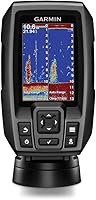
The best fish finder for a jon boat is a compact 3.5-inch unit like the Garmin Striker 4, because it mounts on a small console or bench, runs on a small battery and reads shallow water without crowding an open hull. A castable sonar is the better pick if you fish from a bare boat with no wiring.
On this page (11 sections)
- Why does a jon boat change what fish finder you should buy?
- How should you mount a fish finder on a jon boat?
- Do you need a battery to run a fish finder on a jon boat?
- What sonar features matter in shallow jon boat water?
- Is a castable fish finder better for a bare jon boat?
- How do you choose a fish finder for river fishing from a jon boat?
- Which Striker 4 version should a jon boat owner pick?
- How much should you spend on a jon boat fish finder?
- How do you set up and maintain a fish finder on a jon boat?
- What should you check before buying a fish finder for a jon boat?
- The verdict: which fish finder fits your jon boat?
The best fish finder for a jon boat is a compact 3.5-inch unit like the Garmin Striker 4. It mounts on a flat bench or a small side console, runs on a modest 12-volt battery and reads shallow water without crowding an open aluminum hull.
Jon boats are simple by design. A 12 to 16 ft hull with a bench seat, a tiller and little else leaves few places for a screen.
That shapes every choice below, from screen size to how you power the unit.
If your hull is longer, our roundup of the best fish finders for a 14-foot aluminum boat covers full-size options. This guide focuses on what makes a unit right for a jon boat specifically.
Why does a jon boat change what fish finder you should buy?
A jon boat's open hull and flat bottom dictate a small, tough, easy-to-mount unit. The boat, not the fishing style, sets most of your limits, because every piece of gear shares the same narrow bench.
A 3.5-inch screen is the practical size here. It fits a bracket on a bench seat and leaves room for the tiller arm.
A 5- or 7-inch screen is available in the same Garmin Striker series, but it needs more flat mounting space and a bigger battery.
The flat-bottom hull also matters. Jon boats run in rivers, creeks and shallow flats where the transducer must sit low and stay wet.
A unit with CHIRP sonar, like the Striker 4, sends a continuous sweep of frequencies and produces crisper fish arches with better target separation.
Weight is another factor. The Striker 4 weighs 8 ounces, so it won't tip a small hull or strain a lightweight bracket.
Its IPX7 water rating means splashes from a wet floor are not an instant problem.
Rule: choose a unit whose screen and bracket fit your flat mounting spot first, then match sonar features to the water you fish.
How should you mount a fish finder on a jon boat?
Mount the display on a flat bench or small console with a tilt-and-swivel or panel mount, then run the transducer cable to the transom. Keep the display out of the tiller's swing so you can steer and read depth at the same time.
The Garmin Striker 4 includes a tilt-and-swivel mount, so you can angle the screen toward you while seated. It also ships with transom and motor mounts for the transducer.
That covers the two mounting choices most jon boat owners face.
A bench seat mount works when you sit amidships. A small side console mount suits hulls that have one.
Either way, leave room to reach the controls without leaning over the gunwale.
Route the transducer cable along the hull where it won't catch a shoe or the motor's starting cord. Keep the power cable away from the transducer cable to reduce interference.
Secure both with clips rather than letting them lie loose on the floor.
The transducer needs to sit below the bottom of the hull at the stern, in clean water. On a flat-bottom jon, the motor mount or a small bracket on the transom both work.
Rule: mount the display where you steer, mount the transducer where it stays in clean water, and keep both cables tidy.
Do you need a battery to run a fish finder on a jon boat?
Yes, a wired fish finder needs a 12-volt battery, and a small sealed battery is enough for a compact unit. The portable kit option removes the wiring job entirely for a bare jon boat.
The Garmin Striker 4 runs on a 12-volt supply and draws little current. Its current draw at 12 volts is 0.23 Ampere.
A small sealed battery in a box near the stern will run it for a fishing trip without much weight.
If wiring sounds like more work than you want, the Striker 4 Portable Kit includes a rechargeable battery, an AC charger and a carry bag. You charge it at home and set the unit on its base in the boat.
No hull wiring, no fuse block.
The kit also adds a foam float and a handle, so you can carry the whole unit to the water in one trip. Its transducer still mounts on the transom or the motor, so the cable run is the same.
For a boat you launch from a trailer and leave rigged, the standard unit with a small battery is cheaper and lighter. For a boat you carry in a truck bed, the kit is the easier start.
Rule: pick the kit if you carry the boat or launch from the bank; pick the standard unit if the boat stays rigged on a trailer.
What sonar features matter in shallow jon boat water?
CHIRP sonar and a flasher view matter more than deep-water range on a jon boat. Shallow water rewards a clear picture close to the boat, not the ability to read 1,600 ft.
The Striker 4's CHIRP sonar sends a continuous sweep of frequencies. Garmin says that gives a wider range of information and crisper fish arches with better target separation.
On a creek bend or a shallow flat, that separation helps you tell a fish from structure.
The built-in flasher shows sonar data in the classic flasher format. That view suits vertical jigging, where you drop a lure straight down and watch the display.
It is also handy when ice fishing in winter.
A waypoint map lets you mark spots like brush piles, stumps and docks, then return to them another day. On a jon boat that fishes the same river stretch, that saves time on each trip.
Depth range is not the limit for most jon boat water. The Striker 4 reads up to 1,600 ft in freshwater and 750 ft in saltwater, so shallow rivers and flats sit well inside its range.
Rule: buy for a clear close-range picture and a flasher view, not for maximum depth you will never reach.
Is a castable fish finder better for a bare jon boat?
A castable fish finder is better when you fish from a boat with no mounting space, no wiring and no console. The Deeper PRO+ 2 trades a fixed screen for a wireless cast and a phone app.
You tie the Deeper PRO+ 2 to a line and cast it. It connects over Wi-Fi to the Fish Deeper app on your phone.
It reads to 330 ft and has a built-in GPS that lets you build bathymetric maps from the shore, dock or bank.
That makes it a strong fit for a 12 ft jon boat you launch from a bank or carry in a truck. There is no bracket, no battery box and no cable run.
You cast the sonar where you want to read and watch your phone.
The trade-off is that you read the sonar in the Fish Deeper app on your phone, not on a fixed unit. The PRO+ 2's beam choices (wide, mid and narrow) let you cover water or drill into a spot.
Its target separation is 0.4 in on the narrow beam and 1 in on the wide and mid beams.
If you mostly cast from the bank or fish alone in a bare boat, this is the simpler start. If you want a screen fixed in front of you while you steer, a wired unit wins.
Our guide to fish finders for beginners covers castable and fixed units in more detail.
Rule: pick a castable unit when there is nowhere to mount a screen; pick a wired unit when you want a display at the helm.
How do you choose a fish finder for river fishing from a jon boat?
Choose a unit with clear shallow-water sonar, a flasher view and a waypoint map for river fishing from a jon boat. Rivers reward close-range detail and marked spots more than long-range depth.
Jon boats are common on rivers because they run shallow and turn tightly. A river channel changes with the water level, so a waypoint map that marks stumps and brush piles earns its keep.
The Striker 4's waypoint map handles that.
CHIRP sonar helps separate a fish from a snag in moving water. The flasher view helps when you vertical jig along a ledge or a deep hole.
Both features are built into the Striker 4.
Transducer placement matters more on a river than on a lake. Keep it low and in clean water behind the hull so the reading holds at trolling speed.
Avoid mounting it where the prop wash disturbs the water.
If you fish rivers often, our roundup of fish finders for river fishing covers units built around current and shallow channels.
Rule: for river work, put the flasher view and a waypoint map ahead of raw depth range.
Which Striker 4 version should a jon boat owner pick?
Pick the standard Garmin Striker 4 if your boat stays rigged and you already have a small 12-volt battery. Pick the Portable Kit if you carry the boat, launch from the bank or want no wiring at all.
The screen and sonar are the same in both, so the choice comes down to power and portability.
| Feature | Garmin Striker 4 | Garmin Striker 4 Portable Kit |
|---|---|---|
| Display | 3.5-inch LCD | 3.5-inch LCD |
| Sonar | CHIRP, built-in flasher | CHIRP, built-in flasher |
| Power | 12-volt battery (not included) | Rechargeable battery and AC charger included |
| Mounts | Tilt-and-swivel, transom and motor | Tilt-and-swivel, transom and motor |
| Extras | Power/data cable | Carry bag, foam float, handle |
The standard unit is the lighter, lower-cost way into sonar if the boat lives on a trailer. The kit bundles the battery and bag, so the boat needs no electrical work and you can move the unit between boats.
Both versions share the waypoint map, CHIRP sonar and flasher view. Both include a transducer with transom and motor mounts, so check your motor mount before you order.
If you want the simplest possible setup on a bare hull, the kit is the easier pick. If you already run a battery for a trolling motor or lights, the standard unit slots in beside it.
Rule: choose by how you store and launch the boat, not by the screen, because both versions read the water the same way.
How much should you spend on a jon boat fish finder?
Spend enough for CHIRP sonar and a usable screen, and skip features you won't use on a small open boat. A compact unit covers most jon boat fishing without the cost of a large-screen model.
Budget units often drop CHIRP or the flasher view. Both matter in shallow water and when vertical jigging.
The Striker 4 keeps both at a compact size.
Mid-range money buys a bigger screen or a portable kit with its own battery. A 5- or 7-inch screen helps if you fish standing and want to read depth from a distance.
It also needs more mounting room and a bigger battery on a small hull.
Premium money goes to features like side imaging or down imaging on larger units. Those features help on big water, but they add cost and draw more power than a jon boat usually needs.
A castable unit sits in the middle on cost and removes the mounting and battery work. That suits a bare jon boat used from the bank or a cartop launch.
Set your budget around the features that match your water. For a small river or flat, CHIRP and a flasher view do more than a big screen.
Rule: pay for CHIRP and a flasher view first, screen size second, and imaging features only if your water calls for them.
How do you set up and maintain a fish finder on a jon boat?
Set up the display, transducer and power in that order, then check the reading on the water before you trust it. Clean connections and a tidy cable run prevent most problems on a small open hull.
Start with the display bracket. Mount it on a flat bench or console where you can see it while steering.
Angle it toward your seated position.
Next, mount the transducer at the stern, below the hull bottom and in clean water. Tighten the bracket so it doesn't shift at speed.
Keep the cable clear of the prop and the motor's pull cord.
Then connect the power. Use a small sealed battery in a box, with an inline fuse if your unit's cable calls for one.
Keep the battery near the stern to shorten the cable run.
After launch, check the depth reading in water you know. If the bottom reads wrong or the picture is noisy, adjust the transducer angle.
A small change in height or angle often fixes a poor reading.
Wipe the screen with a soft cloth and fresh water after each trip. Check the transducer face for weeds or mud, since a dirty face weakens the signal.
Store the battery charged and dry between trips.
If your unit feels fussy, our guide to the best and easiest fish finder to use covers simple interfaces and dedicated buttons.
Rule: mount the display, then the transducer, then the power, and test the reading in known water before your first real trip.
What should you check before buying a fish finder for a jon boat?
Check the mounting space, the power supply and the transducer mount before you buy. Fit and wiring decide whether a unit works on your hull, more than the sonar specs on the box.
Measure the flat spot where the display will go. A 3.5-inch unit needs a small bracket footprint.
A 5- or 7-inch screen needs more flat space and a sturdier mount.
Decide how you will power it. A standard unit needs a 12-volt battery and a place to secure it.
A portable kit brings its own battery. A castable unit needs no boat power at all, just a charged sonar and your phone.
Check how the transducer will attach. Transom and motor mounts come with the Striker 4.
If you plan to mount on a trolling motor, confirm the mount type before you order.
Look at the water you fish most. Shallow rivers and flats favor CHIRP and a flasher view.
Deeper lakes may reward a larger screen and imaging features.
Finally, think about storage. A kit with a carry bag packs away in a truck bed or a garage shelf.
A fixed unit stays rigged on the boat.
Rule: measure the mounting spot, settle the power plan and confirm the transducer mount before you buy the best fish finder for jon boat use.
The verdict: which fish finder fits your jon boat?
The Garmin Striker 4 is the best fish finder for jon boat fishing for most people, because its 3.5-inch screen fits a narrow bench and its CHIRP sonar and flasher view suit shallow water. Pick the standard unit if the boat stays rigged; pick the Portable Kit if you carry it or launch from the bank.
Here is the decision rule. Pick the Garmin Striker 4 if you have a small 12-volt battery and a boat that lives on a trailer.
Pick the Garmin Striker 4 Portable Kit if you want no wiring and a bag to carry the unit. Pick the Deeper PRO+ 2 if your jon boat has no mounting space and you fish from the bank or a cartop launch.
Each one covers shallow rivers and flats. The screen, power and mounting fit decide which one suits your hull and your launch routine.
Frequently asked questions
Do you need a battery to run a fish finder on a jon boat?
A wired unit needs a 12-volt battery, usually a small sealed one kept in a box near the stern. A portable kit like the Garmin Striker 4 Portable Kit includes its own rechargeable battery.
A castable sonar like the Deeper PRO+ 2 runs on its own charge and connects to your phone.
How much screen size do you need on a small jon boat?
A 3.5-inch screen is enough on a 12 to 14 ft jon boat because it fits a narrow bench and stays clear of the tiller. Larger 5- and 7-inch models are available in the same Striker series, but they need more flat mounting room and draw more attention from a small open hull.
Will a fish finder work in shallow water on a jon boat?
Yes, shallow flats and river channels are where a jon boat belongs. CHIRP sonar and a transom-mounted transducer read depth in skinny water, while a flasher view helps when you vertical jig.
Keep the transducer low enough to stay in the water at slow speeds.