Best Easy-to-Use Fish Finders With GPS
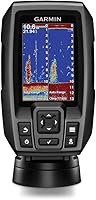
The easiest to use fish finder with GPS for most people is the Garmin Striker 4, because dedicated buttons and a 3.5-inch screen keep you out of menus while you fish. Pick the Striker Vivid 4cv if you want color sonar, or the Striker Cast with GPS if you have no room for a fixed unit.
On this page (9 sections)
- Why button controls beat a bigger screen for easy use
- Garmin Striker 4: the simplest fixed unit here
- Garmin Striker Vivid 4cv: color sonar without extra complexity
- Garmin Striker Cast with GPS: no dash, no bracket
- How these three compare at a glance
- Pick the easy unit for how you fish
- Mapping features you can ignore at first
- Quick answers before you buy
- The bottom line on easy fish finders with GPS
The easiest to use fish finder with GPS is one you can switch on and read without studying a manual on the water. For most people that's the Garmin Striker 4, because dedicated buttons, a 3.5-inch screen and a waypoint map keep the basics within reach.
Nothing here needs a touchscreen or a long setup. You mount the unit, connect power and transducer, then press a button to mark a spot.
The three picks below cover a fixed dash unit, a color version and a castable option for small craft.
Why button controls beat a bigger screen for easy use
Buttons are the first thing to check when ease of use is the goal. A keyed interface with dedicated buttons lets you switch views and save a waypoint without hunting through menus.
Garmin built the Striker 4 around that idea. Garmin describes the unit as simple, with a keyed interface and dedicated buttons, and says it's easy to install.
You press a button for the view you want instead of stepping through nested screens.
Screen size gets the attention, but it changes reading comfort more than operation. A 3.5-inch display is fine when you sit close to the console on a small boat.
The Striker 4's display measures 1.9 x 2.9 inches, with a 3.5 inch diagonal and 480 x 320 pixel resolution. A larger 7-inch screen suits standing at the wheel or reading from a distance.
GPS is the other part of easy use. High-sensitivity GPS on the Vivid 4cv marks waypoints, creates routes and shows boat speed.
That means a spot you find once stays saved, and returning to it is a button press rather than a guess.
Weight matters too, and it's part of why these units stay easy. The Striker 4 weighs 8 ounces.
The Vivid 4cv comes in at 11.2 ounces. A light unit is simpler to angle, adjust and move than a heavy console screen, especially on a small boat where the bracket flexes.
What "easy" means at the ramp
At the ramp, easy means fewer steps between launch and fishing. Download nothing for the fixed units; mount the bracket, run the cable and power on.
The Striker Cast with GPS adds one app download and a pairing step, then it's ready.
The Striker 4 box holds the fishfinder, documentation, power and data cable, tilt/swivel mount, transducer and transom and motor mounts. That's the full install kit in one box.
You're not hunting for a separate bracket before the first trip.
Garmin Striker 4: the simplest fixed unit here
The Striker 4 is our top pick for most buyers because the controls and the waypoint map do the work without asking you to learn a menu tree. A 3.5-inch display shows sonar, and the keyed interface keeps the main functions on the front panel.
Garmin includes ClearVü scanning sonar on this model. Garmin says the high-frequency sonar gives near photographic images with detailed representations of objects, structure and fish.
That helps you tell a brush pile from a fish without interpreting a vague blob. The same transducer also sends CHIRP sonar, which sweeps a continuous range of frequencies.
Garmin says that sweep creates crisper fish arches with better target separation.
The waypoint map is the GPS feature that earns its place. Use it to view, mark and navigate to locations such as brush piles, stumps and docks.
Once a spot is saved, getting back to it is straightforward.
Garmin lists a maximum depth of 1,600 feet in freshwater and 750 feet in saltwater. The unit is water rated IPX7.
It also includes a built-in flasher view for vertical jigging, which keeps the screen useful when you fish straight down. The flasher format suits ice fishing as well, so the same unit works in summer and winter.
Power draw is modest: Garmin lists 0.23 ampere at 12 volt. That's easy on a small boat battery and one less thing to think about on a long day.
A 1-year limited warranty covers it. For a closer look at how it stacks up against the other simple units, our which fish finder is easiest to use comparison covers the trade-offs.
Garmin Striker Vivid 4cv: color sonar without extra complexity
The Striker Vivid 4cv adds color to the same simple idea. Its vivid scanning sonar color palettes separate fish and structure at a glance, and the tilt/swivel bailmount bracket is in the box, so the screen can face you without extra parts.
The 4-inch color display is the main step up. Garmin says the high-contrast palettes make it easier to see what's beneath the surface.
If you've found black-and-white sonar hard to read, color often shortens the learning curve. The change is in how the picture reads, not in how many controls you operate.
The included GT20 transducer provides Garmin CHIRP traditional sonar and CHIRP ClearVü scanning sonar. High-sensitivity GPS marks waypoints, creates routes and shows your boat's speed.
Quickdraw Contours is built in, so you can create and save maps with 1-foot contours as you move.
The footprint is compact for a fixed unit. Garmin lists the Vivid 4cv at 1.8 inches long, 3.9 inches wide and 6.9 inches tall.
That fits a small console or a stern mount without crowding the space you need for rods and lines.
Setup stays simple. The box includes the tilt/swivel mount plus transom and trolling motor mounting hardware and cable.
You're choosing a bracket position, not building a network. The trolling motor hardware means the same transducer can ride on the motor instead of the transom when that's the better spot on your boat.
Garmin backs it with a 2-year limited warranty. If you want a bigger display later, our 7 inch fishfinder gps combination guide explains what changes when you move up in size.
Garmin Striker Cast with GPS: no dash, no bracket
The Striker Cast with GPS is the easiest option when your boat has no room for a fixed unit. It's a castable sonar puck that streams to the free Striker Cast app on your phone or tablet, so you tie it on, cast, and read the sonar in your hand.
Setup takes minutes. Download the app, pair your mobile device with the sonar and start fishing.
There's no bracket to fit and no cable to run to a console. The app works with Apple or Android devices.
The sonar streams wirelessly from up to 200 feet away. Traditional 2-D and ice fishing flasher modes both come through the app, and Garmin says it performs well in shallow and deep water.
Built-in GPS lets you create custom fishing maps with 1-foot contours using Quickdraw Contours, and you can download maps from the Garmin Quickdraw Community.
The internal USB-rechargeable battery lasts 10+ hours, and Garmin notes that figure varies with use. It powers on when floating in water and turns off when you remove it.
The body is water-resistant to IPX6 and IPX7 standards. Garmin says to use it with 20 lb test line or heavier.
The unit weighs 75 grams and measures 6 inches long, 2.1 inches wide and 3 inches tall, so it packs into a bag or a tackle box without fuss.
Garmin includes a carrying bag, a 20 ft tether and a USB charging cable. The tether matters when you cast from a dock or a kayak, since it gives you a line to pull the puck back in.
Our fish finder with gps roundup shows where this puck fits among full-size units.
How these three compare at a glance
The table below lines up the features that affect daily use: screen, mounting, sonar and mapping. All three save waypoints with GPS; the differences are how you view the sonar and how the unit attaches to your boat.
| Feature | Striker 4 | Striker Vivid 4cv | Striker Cast with GPS |
|---|---|---|---|
| Display | 3.5-inch | 4-inch color | None, streams to your phone |
| Mounting | Tilt/swivel bracket | Tilt/swivel bailmount | None, cast and reel |
| Sonar | CHIRP, ClearVü | CHIRP, ClearVü | Traditional 2-D and flasher |
| GPS mapping | Waypoint map | Waypoint map and Quickdraw Contours | Quickdraw Contours via app |
| Wireless | No | No | Yes, up to 200 ft |
The Striker 4 and Vivid 4cv share the fixed-unit approach. You mount a screen, run a cable and read the display at the console.
The Vivid 4cv gives you color and 4 inches instead of 3.5, plus Quickdraw Contours.
The Striker Cast changes the routine. There's no screen on the boat; your phone is the display.
That suits a kayak, a small dinghy or the bank, where a bracket and cable would get in the way. The trade-off is that you supply the display and keep it charged, while the puck runs on its own internal battery.
Warranty length differs across the three. The Striker 4 carries a 1-year limited warranty.
The Vivid 4cv and the Striker Cast each carry a 2-year limited warranty. All three are Garmin units with manufacturer part numbers printed on the box, so you can confirm the exact model when you order.
Which mounting style fits your boat
A fixed bracket suits a boat with a console or a clear spot at the stern. You set the angle once and leave it.
The Cast suits craft with no flat mounting surface, or anglers who move between boats and the shore. If you fish from several boats in a season, the castable puck follows you without unbolting anything.
Pick the easy unit for how you fish
Start with your boat and your routine, then choose. **Pick the Striker 4 if you want the simplest fixed unit and the lowest learning curve.
Pick the Vivid 4cv if color sonar is worth a slightly bigger screen.
Pick the Cast if you have no dash.**
That's the short version. The rest comes down to small preferences: screen size, bracket space and whether you want an app in the mix.
Power is another small difference, since the fixed units draw from the boat's 12 volt supply while the Cast runs on its own rechargeable battery.
If you mostly fish from a console boat and want a unit you set up once, the Striker 4 is the safe choice. Its buttons and waypoint map cover the basics without extra steps.
You can find more button-driven options in our roundup of the easiest fish finder to use.
If reading structure matters more than the smallest footprint, the Vivid 4cv's color palettes earn the extra inch. Its included bracket means no separate mount to buy.
If your boat is a kayak, a canoe or a rented craft, the Cast avoids installation entirely. Pair it with your phone and fish.
Remember the 10+ hour battery figure and the 20 lb test line guidance when you rig it up.
Mapping features you can ignore at first
Quickdraw Contours and route planning are useful, but you don't need to learn them on day one. Get comfortable reading depth and sonar first, then add mapping when the basics feel natural.
The Striker Vivid 4cv and the Striker Cast both include Quickdraw Contours. It creates and saves maps with 1-foot contours as you move over the water.
On the Cast, the app handles it and you can download maps from the Garmin Quickdraw Community.
The Striker 4 offers a waypoint map rather than contour mapping. For many anglers that's enough: mark the stump or brush pile, name it, return later.
The map view shows the saved locations so you can plan a short run between spots.
Routes are another optional layer. High-sensitivity GPS on the Vivid 4cv supports routes as well as waypoints.
Start with waypoints, add a route once you know the water. The Cast's built-in GPS supports its mapping the same way, so the app route is the same idea with a different screen.
Set up the basics in order
Power on, check depth, then mark one waypoint. Repeat on your next trip.
Mapping and routes come after that, and only if you'll use them. Keeping the first few trips simple is the point of an easy unit.
Quick answers before you buy
Do all three have GPS? Yes.
Each unit here marks waypoints and supports mapping features, though the way you view them differs between a fixed screen and an app.
Does easy mean cheap? No.
These are mid-range units from Garmin, and ease comes from the controls and setup, not the tier.
Price tiers vary by seller and season.
Can I move a fixed unit between boats? The bracket and cable make a fixed unit less portable than the Cast.
If you switch boats often, the castable option saves time.
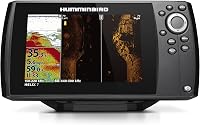
Is a bigger screen easier? A 7-inch screen is easier to read from a distance, but it doesn't reduce the buttons you press.
Start with what fits your console and your eyesight.
What about ice fishing? The Striker Cast has an ice fishing flasher mode.
The Striker 4 includes a built-in flasher view too.
Both handle vertical jigging through the ice, and the Cast works below ice according to Garmin. Garmin also lists the Cast as water-resistant to IPX6 and IPX7, which covers splashes and short dunkings within those limits.
Which one would you pick? The Striker 4 for a first fixed unit, the Vivid 4cv for color, and the Cast for a boat with no room to mount anything.
The bottom line on easy fish finders with GPS
The easiest to use fish finder with GPS depends on where you fish, but the Striker 4 is the best pick for most people. It pairs dedicated buttons with a waypoint map, so you spend your time fishing instead of reading menus.
Choose the Striker Vivid 4cv when you want color palettes and a 4-inch screen with the same simple controls. Choose the Striker Cast with GPS when a fixed install doesn't fit your boat or your shore routine.
Each one saves spots and returns you to them. Pick the mounting style that matches your water, and keep the first few trips to the basics.
If you're still weighing screen sizes against controls, the which fish finder is easiest to use comparison and the best fish finder with gps roundup cover the next step.
Frequently asked questions
What makes a fish finder easy to use?
Dedicated buttons or a simple app matter more than screen size. A unit you can switch on, read and mark a spot with in seconds beats a larger screen that buries the basics in menus.
Mounting also counts, since a bracket that fits your boat means less setup time.
Do I need GPS on a fish finder?
GPS is what lets you mark a waypoint and return to the same spot, so it's worth having if you fish the same water more than once. Without it you get depth and sonar images but no saved positions.
On the Striker Cast, GPS also feeds Quickdraw Contours map building.
Can a fish finder without a screen be easy to use?
Yes. The Garmin Striker Cast with GPS has no display of its own; it sends sonar to the free Striker Cast app on your phone or tablet.
Setup is app download, pair and cast.
It's the simplest option for shore, dock or kayak fishing.
Is a color fish finder harder to use than a black-and-white one?
No. Color changes how the sonar image reads, not how many buttons you press.
The Striker Vivid 4cv uses color palettes to separate fish from structure, and its tilt/swivel bracket is included.
Pick color for easier interpretation, not for extra controls to learn.
How do I learn a new fish finder quickly?
Start with the sonar screen and the waypoint button only. Mark one spot, return to it and repeat.
Leave mapping features like Quickdraw Contours until the basics feel automatic.
A keyed interface with dedicated buttons, like the Striker 4, makes that first step shorter.
What size screen should a beginner choose?
A 3.5 to 4-inch screen is enough for depth and sonar at close range on a small boat. Step up to a 7-inch unit if you fish standing and want to read the screen from a distance.
Screen size affects reading comfort more than ease of operation.