Best and Easiest Fish Finders to Use
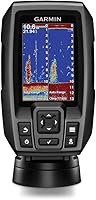
The best and easiest fish finder to use for most people is the Garmin Striker 4, because dedicated buttons and a keyed interface keep every screen a press or two away. The Garmin Striker Vivid 4cv is the easy pick when you want bright color and scanning sonar.
On this page (8 sections)
- What makes a fish finder easy to use?
- Which Garmin Striker is easiest for a first boat?
- When is the Vivid 4cv the easier choice?
- Is a castable fish finder the easiest option of all?
- How do screen size and mounting change the feel?
- Which sonar features do you actually need?
- How do you set up an easy fish finder in one trip?
- Which one should you pick?
The best and easiest fish finder to use is the Garmin Striker 4, because its keyed interface and dedicated buttons keep the screens you need one press away. The Garmin Striker Vivid 4cv is the easy upgrade when color and scanning sonar matter more to you than the smallest screen.
Ease is not about the longest feature list. It is about how fast you can turn the unit on, read the bottom and get back to fishing.
That means a short menu path, a screen you can see in daylight and a mount that holds the unit steady. The three Garmin units below cover the main ways to buy an easy fish finder.
Our picks at a glance
-
1
-
2

-
3

What makes a fish finder easy to use?
The easiest fish finders share four traits: dedicated buttons, a readable screen, a steady mount and a short setup. Anything beyond that adds features you may never reach on the water.
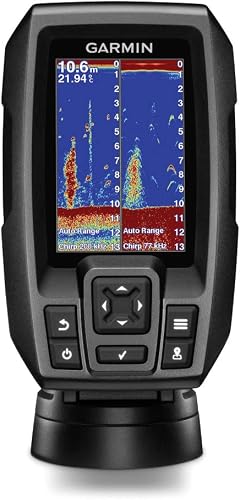
Garmin's own wording for the Striker 4 is telling: it describes a keyed interface with dedicated buttons. That is a design choice, not marketing fluff.
Each key has one job, so you press it instead of hunting through a menu tree while the boat drifts.
Screen size matters just as much. A 3.5 inch display fits a small console and stays close to your line of sight.
A 4 inch screen shows more detail, but it also takes more dash space. The Vivid 4cv measures 1.8 inches deep, 3.9 inches wide and 6.9 inches tall, while the Striker 4 body is 3.6 inches long, 1.6 inches wide and 5.9 inches tall.
Those are small differences on paper, but they matter when the dash is already full of throttle, switches and a phone mount.
Mounting is the third piece. Both Striker units include a tilt and swivel bracket, which lets you angle the screen toward you as you move around the boat.
A loose mount turns a simple unit into a frustrating one.
Why buttons beat menus on the water
A physical button gives you a click you can feel, which helps with wet hands or winter gloves. Menus layered behind a single key cost you time and attention.
When the boat is drifting toward a dock or a weed edge, a press you can feel without looking down keeps you fishing longer.
The Garmin Striker 4 puts its core actions on dedicated keys. The Striker Vivid 4cv adds a color display and scanning sonar without turning the interface into a puzzle.
Neither unit asks you to learn a touchscreen gesture or a hidden settings layer before you can read depth.
Keep the number of screens you use small. Most anglers need depth, sonar and the waypoint map, and a keyed unit keeps those close together.
The screen you never open cannot confuse you.
One more trait deserves a mention: the mount hardware that comes in the box. The Striker 4 includes its transducer, power and data cable, tilt and swivel mount, and transom and motor mounts.
The Vivid 4cv includes its GT20 transducer, power and data cable, tilt and swivel mount and hardware. A unit that ships complete is easier to fit than one that needs extra brackets.
Which Garmin Striker is easiest for a first boat?
For a first boat, the Garmin Striker 4 is the easier buy because its 3.5 inch screen and keyed interface keep the unit small and the learning curve short. The Striker Vivid 4cv is the better fit once you want color and more sonar detail.
The Striker 4 is a 3.5 inch GPS fishfinder with CHIRP sonar. Garmin pairs the display with a transducer, power and data cable, tilt and swivel mount, and transom and motor mounts in the box.
Nothing extra is needed to get a reading.
Its ClearVü scanning sonar gives you a high-frequency view around the boat, while CHIRP sonar sends a continuous sweep of frequencies. Garmin says that sweep produces crisper fish arches with better target separation.
For a beginner, that means easier marks to read.
The waypoint map lets you mark brush piles, stumps and docks and return to them. Depth capability is rated at 1,600 feet in freshwater and 750 feet in saltwater.
Those numbers go far beyond most inland fishing. The display resolution is 480 x 320 pixels, and the active area measures 1.9 x 2.9 inches, so the pixel count is packed into a small window.
That density is part of why the small screen stays readable.
The unit also includes a built-in flasher view, which shows sonar data in the classic flasher format. Garmin calls it ideal for ice fishing or vertical jigging.
If you fish through ice in winter and open water in summer, one unit covers both seasons.
The water rating is IPX7, so splashes and rain are not an instant problem. Current draw is 0.23 amps at 12 volts, which is light on a small boat's battery.
The whole unit weighs 8 ounces.
Pick the Striker 4 if you steer from a small console or tiller. Its compact body and simple keys leave room for your hands and your line.
Move up only when the screen feels too small in bright sun.
When is the Vivid 4cv the easier choice?
The Garmin Striker Vivid 4cv is easier to read in bright light and cluttered structure, thanks to high-contrast color palettes and scanning sonar on a 4 inch screen. It costs you a little more dash space than the Striker 4.
Garmin says the vivid scanning color palettes make it easier to tell fish from structure. The unit includes a GT20 transducer for CHIRP traditional sonar and CHIRP ClearVü scanning sonar.
A tilt and swivel bail mount is in the box.
High-sensitivity GPS lets you mark waypoints, plan routes and see your boat's speed. Built-in Quickdraw Contours mapping lets you build and save maps with 1 foot contours as you move.
That last feature is the quiet difference between the two units. On the Striker 4 you mark spots as waypoints.
On the Vivid 4cv you also draw the bottom as you go, so a return trip has a map instead of a single dot.
The display is a 4 inch color LCD with a bright palette. Color palettes sound like a cosmetic extra, but on a busy bottom they do real work.
A weed edge, a rock pile and a school of fish all return differently, and the right palette separates them at a glance.
Pick the Vivid 4cv if you fish structure and want color to separate fish from cover. The brighter palettes help when the bottom is busy with rocks, weed edges or sunken timber.
On open water with a plain bottom, the Striker 4 gives you the same core job for less screen space.
If you are still comparing models across brands, our guide to which fish finder is easiest to use covers the wider field.
Is a castable fish finder the easiest option of all?
A castable fish finder is the easiest to set up and the easiest to use from shore, but it is not the easiest while you steer a boat. The screen lives on your phone, so you watch a device instead of the water ahead.
The Garmin Striker Cast pairs with the free STRIKER Cast app on an Apple or Android device. You download the app, pair the sonar and start fishing in minutes.
Sonar streams wirelessly from up to 200 feet away.
It offers traditional 2-D sonar and an ice fishing flasher mode. Garmin says it performs well in shallow and deep water and can work below ice.
Battery life is rated at more than 10 hours, and the internal battery recharges over USB.
The unit weighs 75 grams and measures 6 inches long, 2.1 inches wide and 3 inches tall. It ships with a carrying bag and a 20 foot tether.
The tether matters more than it sounds, because a castable sonar is only as useful as your ability to reel it back in and cast it again.
It conserves power by turning on when it floats and off when you lift it out. Maps with 1 foot contours are available through the Garmin Quickdraw Community.
The app streams both traditional and flasher views, and Garmin lists setting adjustments for gain and range.
Pick the Striker Cast if you fish from shore, a dock or a paddle craft. Reel it in to locate fish and read the display on your phone.
Skip it as your main boat unit if you want your eyes on the water while you run the motor.
How do screen size and mounting change the feel?
Screen size and mount quality decide whether a simple unit stays easy after the first hour. A smaller screen that sits close and steady beats a bigger screen bolted too far away.
The Striker 4's 3.5 inch display has a resolution of 480 x 320 pixels. The Vivid 4cv uses a 4 inch color LCD.
In practice, the smaller unit packs more detail into fewer inches, so text and marks stay close together. The larger screen gives you more color and a wider view of the water beneath you.
Mounting type differs too. The Striker 4 uses a panel mount setup with a tilt and swivel bracket.
The Vivid 4cv ships with a bail mount bracket. Both let you tilt the screen, but the physical footprint differs on a crowded dash.
Garmin also lists transom and trolling motor mounting hardware in both boxes, so the transducer end of the install is covered either way.
Choosing between the two mounts
A bail mount cradles the unit and lets you tip it toward your seat. A panel or swivel mount holds the unit on a base you can rotate.
On a narrow console, the smaller base usually wins. The swivel base lets you turn the screen toward a fishing partner or toward the tiller without moving the unit.
Measure the free space on your dash before you buy. A 4 inch screen needs more clearance than a 3.5 inch one, and the mount adds a little more.
The Vivid 4cv's listed height of 6.9 inches includes its body; leave extra room above it so the tilt range is not blocked by a windshield or a grab rail.
Both units are powered from the boat's 12 volt supply. The Striker 4 draws 0.23 amps at 12 volts.
Run the power cable along a protected route and leave slack so the tilt does not pull on the wire. A cable that is tight at the bracket will work loose over a season.
If your dash space is truly tight, think about the tilt and swivel range rather than the screen alone. A unit you can angle toward your seat stays readable from more positions, which matters more than an extra half inch of glass.
Which sonar features do you actually need?
You need depth, a clear bottom reading and enough sonar to tell fish from structure. Everything beyond that is a nice extra, and every extra adds a screen or a menu.
CHIRP sonar sends a continuous sweep of frequencies rather than a single pulse. Garmin says that sweep gives a wider range of information and crisper fish arches.
For a casual angler, the practical effect is easier target separation in the display. Better separation means a fish sitting close to the bottom stands out instead of blending into the bottom line.
ClearVü scanning sonar shows more of what is in the water around the boat. Garmin describes the high-frequency images as near photographic, with detailed views of objects, structure and fish.
It is most useful when you fish cover. A brush pile or a dock piling shows its shape, not just a blob.
GPS is the feature most people underrate. It lets you mark a waypoint and return to it.
Both Striker units include it, so a brush pile or a channel edge becomes a saved spot instead of a lucky find. The Vivid 4cv goes a step further with route planning and a speed readout from the same GPS.
What to skip when you want easy
Skip features that only pay off with a bigger screen and more time on the water. Side imaging, large chartplotter networks and multi-pane dashboards are powerful, but each one asks you to learn a new view before it helps you catch fish.
An easy unit gives you one or two sonar views you understand and a waypoint map you can trust. The Striker 4 covers that with CHIRP sonar, ClearVü scanning and the waypoint map.
The Vivid 4cv adds color palettes and Quickdraw Contours mapping to the same basic recipe.
Read the depth rating in context. The Striker 4's 1,600 feet freshwater and 750 feet saltwater figures are far beyond the water most people fish.
A shallow lake or river does not need those numbers, but they tell you the sonar has headroom.
Reading your screen without a manual
Start with the depth number and the bottom line. Then look for the shape of the marks above the bottom.
A solid arch usually means a fish, while a fuzzy band near the bottom often means soft ground or weeds. CHIRP's crisper arches make that first read easier.
Keep one screen visible at a time until you know it well. A keyed interface makes that easy, because you can flip back to the sonar view without losing your place.
The flasher view on the Striker 4 is a good second screen to learn, especially for vertical jigging or ice fishing.
Practice on water you already know. When you pass over a spot where you have caught fish before, you can match the marks on the screen to what you know is below.
That is faster than reading a manual, and it builds the confidence that makes a unit feel easy.
How do you set up an easy fish finder in one trip?
Setup is simple when you do it in the right order: mount the display, fit the transducer, run the cable and test on the water. A single careful install saves you from redoing it later.
Mount the bracket where you can see the screen without turning your head far. On a small boat, that usually means the console top or a spot near the tiller.
Leave room for the tilt and swivel range.
Fit the transducer at the transom according to the supplied hardware. Both units include transom and motor mounts.
Keep the transducer face clear of strakes and through-hull fittings so it reads clean water. The GT20 transducer on the Vivid 4cv covers CHIRP traditional and ClearVü scanning, so its mounting angle matters more than a simple depth-only puck.
Run the power and data cable away from sharp edges and moving parts. Leave a little slack at the bracket so tilting the screen does not strain the wire.
On the Striker Cast there is no cable to run at all, because the sonar streams to your phone; just charge it over USB and pair the app.
Then launch the boat and test at slow speed first. Check depth readings in water you know and confirm the screen holds steady when you turn.
Adjust the tilt until the display is easy to read while seated. If the bottom line looks noisy, check that the transducer is not sitting in disturbed water behind a strake.
Finish with a waypoint test. Mark a spot you know, run away from it and navigate back.
That one drill proves the GPS works and gives you the habit that makes a fish finder genuinely useful.
Which one should you pick?
Pick the Garmin Striker 4 for most people, because its dedicated buttons and 3.5 inch screen make it the easiest unit to run without practice. Pick the Garmin Striker Vivid 4cv when color palettes and scanning sonar help you read structure.
Pick the Garmin Striker Cast when you fish from shore or a paddle craft and want the app to do the work.
That order covers the three ways people fish. If you are buying your first unit, our fish finders for beginners guide narrows the field further.
River anglers should read our fish finder for river fishing picks before deciding. And if marking spots matters most, compare models in our fish finder with gps roundup.
The best and easiest fish finder to use is the one you can read and control without thinking about it. For most buyers, that is a small keyed unit with a steady mount and built-in GPS.
Frequently asked questions
What is the best and easiest fish finder to use for a first boat?
A small Garmin Striker with dedicated buttons is the easiest starting point for a first boat. The Striker 4 gives you sonar, GPS and waypoints without menus to learn, and its 3.5 inch screen leaves more room on a small console.
Do I need a touchscreen to get an easy fish finder?
No. Dedicated buttons are often easier on the water than a touchscreen, because you can press them with wet or cold hands.
The Garmin Striker 4 uses a keyed interface built around physical buttons.
Is a castable fish finder easier than a fixed unit?
A castable unit is easier to set up and easier to use from shore or a dock. A fixed unit is easier to use while you steer, because the screen stays in front of you and there is nothing to reel in.
How much should a simple fish finder cost?
Simple models sit in the budget to mid-range tiers. Price varies with screen size and sonar type, so compare features you will actually use rather than buying the biggest screen.
Can an easy fish finder mark spots so I can return to them?
Yes, if it has built-in GPS. The Garmin Striker 4 and Striker Vivid 4cv both include GPS for marking waypoints, so you can find a brush pile or drop-off again on a later trip.